Best OBD2 Scanners for BMW: Coding, Adaptations, Diagnostics
Generic scanners clear the check engine light but miss BMW-specific module codes. Here's what to buy for real diagnostics, and where dedicated BMW coding software takes over.
Disclosure: This article contains affiliate links. If you buy through them we may earn a commission at no extra cost to you.
Why generic OBD2 scanners miss BMW-specific problems
Every OBD2 scanner sold in the US can read the federally mandated powertrain codes on a BMW — that part of the protocol is standardized and legally required on every car sold since 1996. Plug in any $20 code reader and it will pull a P0300 misfire or a P0171 lean-condition code just fine.
The catch is that BMW's real diagnostic depth lives outside that mandated layer. BMW cars run a dozen-plus modules — DME/DDE (engine), EGS (transmission), CAS (car access), FRM (lighting), and more — that talk over a proprietary network layer most budget scanners can't touch. A cheap reader that only speaks generic OBD2 will see the engine light and the powertrain code, but stay blind to an ABS module logging a wheel-speed sensor fault, an SRS module flagging a seatbelt tensioner circuit, or a body module throwing an angel-eye ballast fault. Owners consistently report that a code reader clears the light without ever showing them why it came back on two days later — because the actual fault lived in a module the tool never queried.
No spam. Unsubscribe anytime.
What actually works: BlueDriver and TOPDON for real diagnostics
For BMW owners who want honest, full-vehicle code reading without stepping into dedicated coding software, two tools in this price band do the job:
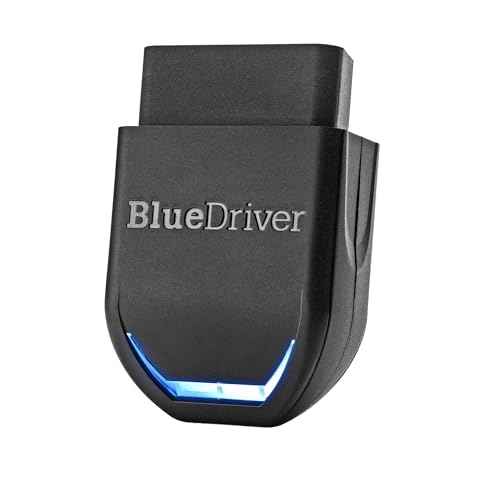
- Check price on Amazon → — BlueDriver Pro Next Gen. Its enhanced diagnostics mode is built to reach beyond the generic powertrain layer into manufacturer-specific modules, per the product documentation, and its 8,000+ crowd-sourced "Repair Reports" database is heavy on European makes, including BMW. That's valuable because it tells you what other BMW owners with the same code actually replaced — not just what the code technically means.
- Check price on Amazon → — TOPDON TopScan Lite. Bi-directional support and 8 service reset functions (per the spec sheet) mean it can do more than read — it can command certain modules, which matters for BMW service tasks like resetting oil-service intervals or running basic bleed procedures after brake work.
Both connect over Bluetooth to a phone app, which is the practical way to work on a BMW in a driveway: you need to be in the driver's seat to clear codes and watch live data at the same time.
Where a general scanner tops out — and coding begins
Be honest with yourself about what these tools are for. Reading ABS, SRS, transmission, and body-module codes is diagnostics. Coding is a different discipline entirely: changing what a module is programmed to do — enabling a hidden feature, adapting a replacement part's identity to the car (module coding), or flashing updated firmware.
That work runs through BMW-specific software such as ISTA (BMW's factory tool) or enthusiast tools built around the ENET/K+DCAN interface — the widely known names in that space are Bimmercode and similar coding apps, which talk to the car over a BimmerCode-compatible adapter rather than a generic OBD2 Bluetooth dongle. A BlueDriver or TOPDON will not code a module. They are diagnostic instruments: they tell you what's wrong and, at best, reset a service light or run a basic function. If your goal is retrofitting a feature or adapting a replacement part after a repair, budget separately for a dedicated BMW coding interface and software license — that's a different purchase than anything in this scanner roundup.
One adapter built around BimmerCode
A refinement to the cable point above: per the Amazon listing, the OBDLink CX is a Bluetooth 5.1 OBD2 adapter for BMW and Mini that works with iPhone and Android, "Made for BimmerCode and recommended by the BimmerCode Team." The BimmerCode app is sold separately, and the listing tells buyers to confirm vehicle compatibility in its troubleshooting guide and the app. It also includes the OBDLink app for live parameters, diagnostics and clearing the check-engine light. That makes it the coding interface to budget for, separate from the diagnostic scanners compared below. Check the current price on Amazon.
Scanner comparison for BMW use
| Scanner | Reads beyond powertrain? | Bi-directional / resets | Best for |
|---|---|---|---|
| BlueDriver Pro Next Gen | Yes, per enhanced diagnostics mode | Limited resets | Full-system code reading + repair-report cross-reference |
| TOPDON TopScan Lite | Yes | 8 reset functions | Owners who also want to run service resets themselves |
| ANCEL AD310 | No — powertrain/OBD2 generic only | No | Confirming a check-engine code before a shop visit, nothing more |
If you already own an ANCEL AD310 or similar basic reader, it's not useless on a BMW — it will still confirm the engine-light code. It just can't see the rest of the car. See our breakdown on scanners that read ABS, airbag, and transmission codes for more on that gap.
A practical note on model years and modules
Older BMWs (roughly E-chassis cars from the 2000s through early 2010s) tend to have fewer modules chattering on a slower network, and a Bluetooth OBD2 dongle typically has an easier time reaching them consistently. Newer F- and G-chassis cars pack more modules onto a faster, more segmented network, and owners consistently report occasional dropped connections or partial module scans on Bluetooth adapters — not a defect exactly, more a reminder that Bluetooth dongles are working through a wireless bridge to a network that wasn't originally designed with an aftermarket dongle in mind. If a scan comes back incomplete on a newer BMW, rerunning it typically resolves the gap; a hardwired professional tool is the only way to guarantee zero dropped modules every time, and that's a different budget tier entirely from anything covered here.
It's also worth setting expectations around cost. A BlueDriver or TOPDON is a one-time purchase in the $50-$95 range with no subscription. A dedicated BMW coding interface plus software license typically runs well beyond that, and often carries an annual license fee on top of the initial hardware cost — which is exactly why it's worth being clear about which category of problem you actually have before you buy either type of tool.
The bottom line
If you drive a BMW and want one tool that reads what's actually wrong across the car — not just the engine light — get the BlueDriver Pro Next Gen for its enhanced diagnostics and repair-report database, or the TOPDON TopScan Lite if you also want bi-directional service resets. Neither one codes a module or retrofits a feature — that's a separate, BMW-specific coding tool and cable. For a BMW owner on a budget who only needs the powertrain code confirmed before a shop visit, see our scanners under $100 roundup for the cheaper options, understanding they won't reach BMW's other modules.
Buying this as a gift and can't decide? Send a Giftcards.com gift card instead →
Affiliate Disclosure